Clipsharing

Changelog

Clipsharing

更新日志

V1.3

V1.3 Changelog

This Windows update fixes pasting text copied from iOS photo text recognition.

Windows

  • Fixed an issue where text extracted and copied from photos in the iOS Photos app could not be pasted correctly on Windows.
V1.2

V1.2 Changelog

This Windows update streamlines configuration, adds rich text clipboard support, and fixes an issue with receiving some text copied from iOS.

Windows

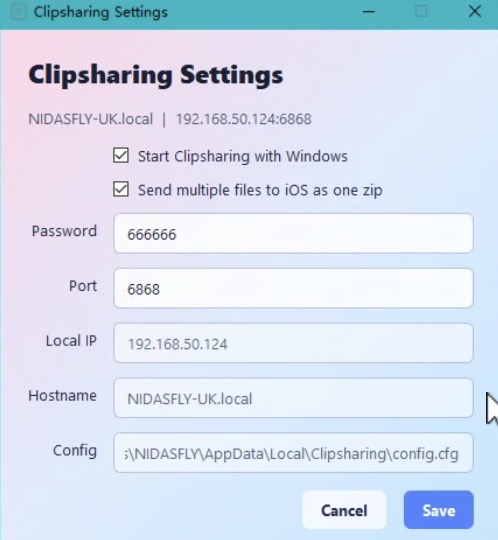
  • Removed the web-based configuration page. Settings are now managed only through the Windows app UI: right-click the taskbar icon and choose Setting.
  • Added support for RTF rich text, improving clipboard transfers that include formatted text.
  • Fixed an issue where text copied from iOS apps such as Notes could fail to upload to Windows.
V1.1

V1.1 Changelog

Single-file uploads from the iOS share sheet now keep the original file name on the computer.

Shortcuts

  • Single-file uploads from the share sheet to the computer now preserve the original file name.
V1.0

V1.0 Changelog

This update improves the Windows app and iOS Shortcut experience, making clipboard sync, image pasting, and file saving smoother.

Windows

  • Refactored the main code framework for smoother clipboard reading and writing.
  • Images from iOS can now be pasted as files into File Explorer, or pasted directly as images into apps such as Photoshop and Word.
  • Added a configuration UI. Right-click the taskbar icon to edit settings directly in the app.
  • Fixed several known issues.
Windows configuration UI

Shortcuts

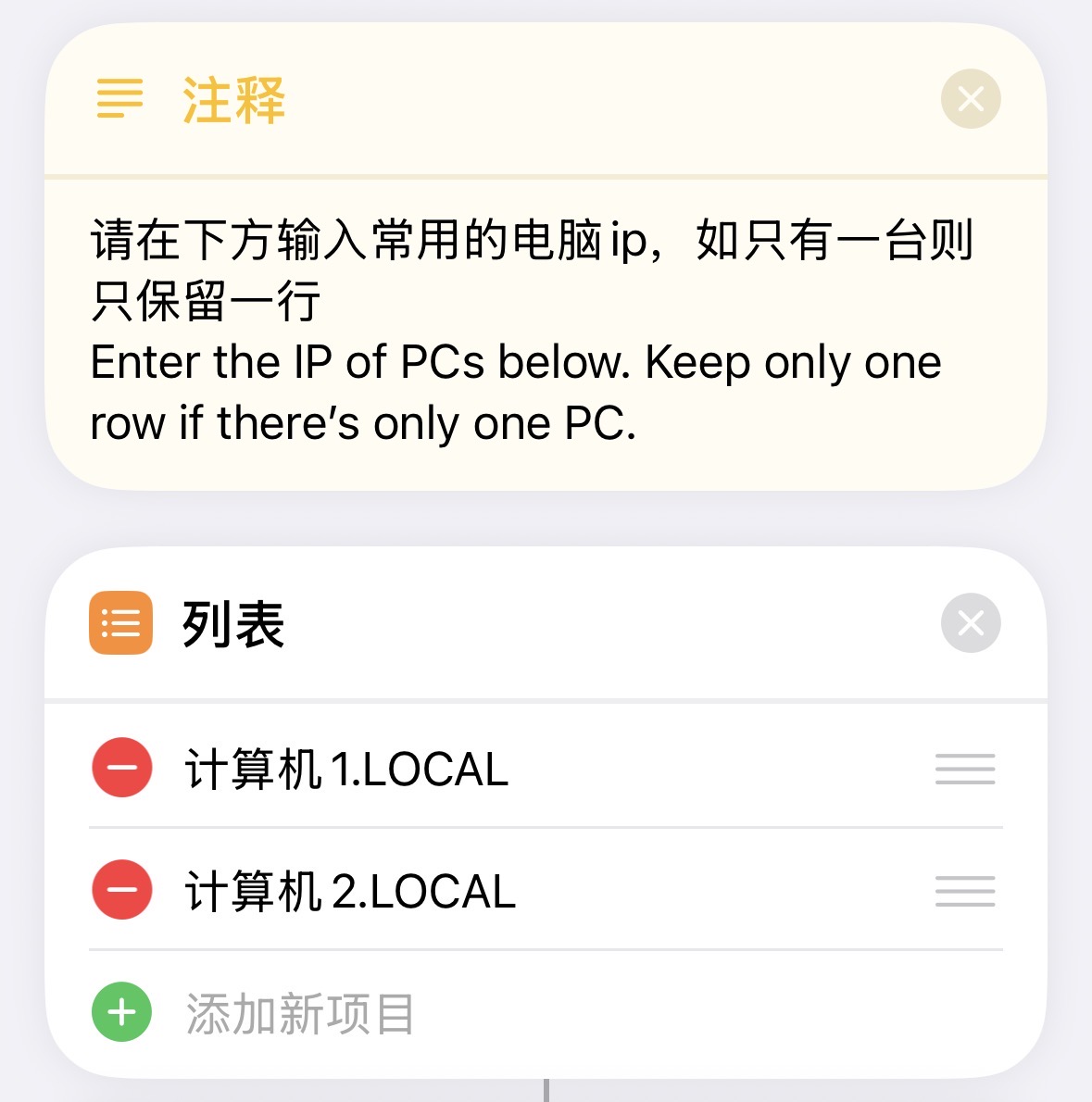
  • Improved IP address handling. On launch, you can choose a computer IP from a list, which works better across multiple computers and locations. If only one IP is saved, no manual selection is needed.
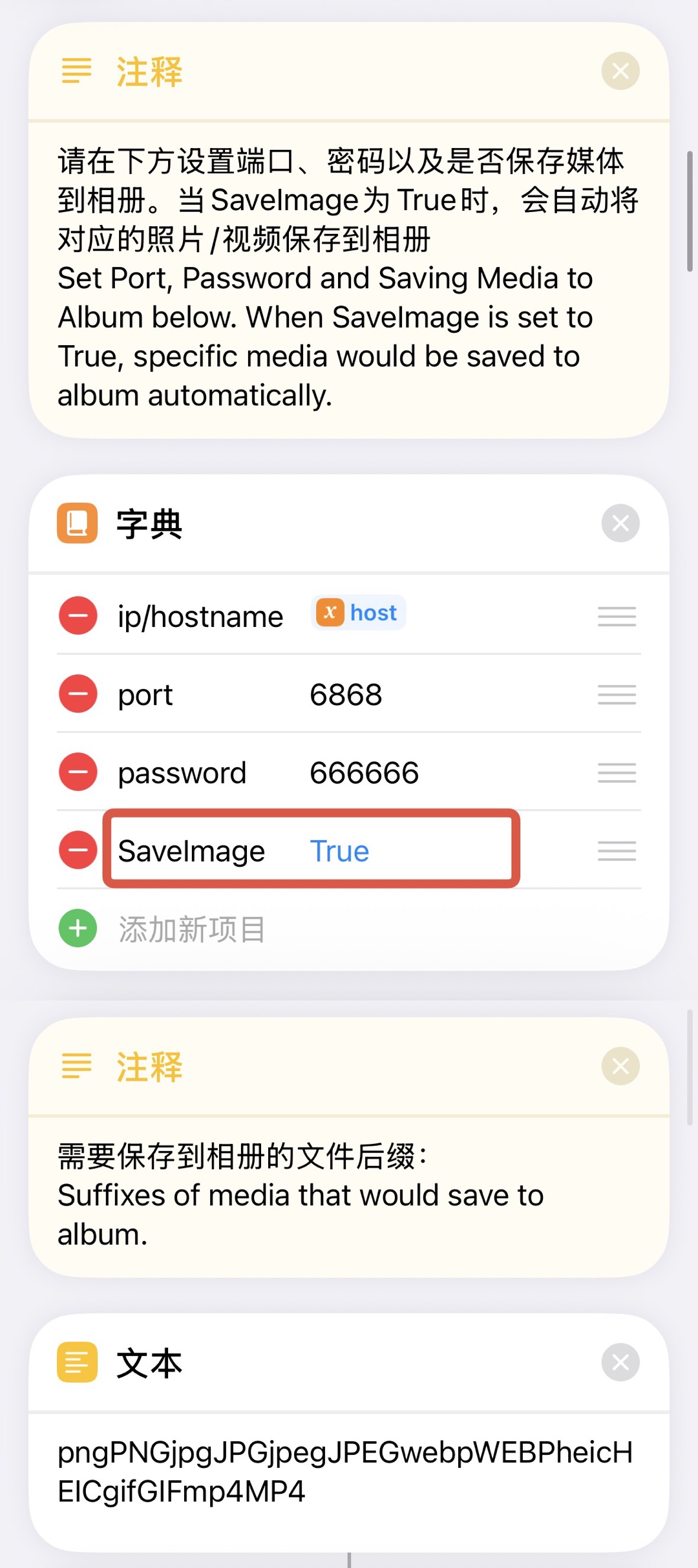
  • Added automatic saving for files and videos to Photos, with editable media suffixes for auto-save rules.
  • Improved the logic for uploading a single file to the computer through the share sheet.
  • Fixed several known issues so the Shortcut runs more smoothly.
Shortcut IP address list
Choose a computer IP on launch
Shortcut auto-save image settings
Auto-save media settings

Auto-Save Image Settings

  • Set SaveImage to True or False in the dictionary to enable or disable automatic image saving.
  • Add or remove file suffixes in the text field to control which media types are saved to Photos.
V1.3

V1.3 更新日志

本次更新聚焦 Windows 端,修复了从 iOS 照片文字识别结果复制文本后无法在 Windows 端粘贴的问题。

Windows

  • 修复了从 iOS 相册图片中提取并复制文字后,内容无法在 Windows 端正常粘贴的问题。
V1.2

V1.2 更新日志

本次更新聚焦 Windows 端:调整配置入口,新增富文本剪贴板支持,并修复部分 iOS 文本无法同步到 Windows 的问题。

Windows

  • 移除了网页版配置设置页面。现在所有配置都通过 Windows 客户端 UI 修改:右键任务栏图标,选择 Setting 即可打开设置。
  • 新增 RTF 富文本支持。跨设备复制文本时,可以更好地保留富文本内容。
  • 修复了从 iOS 备忘录等 App 复制文本后,部分内容无法上传到 Windows 的问题。
V1.1

V1.1 更新日志

现在通过共享表单上传单个文件到电脑可以保留原文件名。

快捷指令

  • 通过共享表单上传单个文件到电脑时,现在可以保留原文件名。
V1.0

V1.0 更新日志

本次更新主要优化了 Windows 端和 iOS 快捷指令的使用体验,让剪贴板同步、图片粘贴和文件保存更顺手。

Windows 端

  • 重构了代码主体框架,剪贴板读取和写入更流畅。
  • 现在来自 iOS 的图片可以直接作为文件粘贴到资源管理器,也可以直接作为图片粘贴到 Photoshop、Word 文档等软件中。
  • 新增配置修改界面。现在可以右键任务栏图标,在软件 UI 中直接修改配置。
  • 修复了一些已知问题。
Windows 配置修改界面
Windows 配置修改界面

快捷指令

  • 优化了 IP 地址记录逻辑。启动时可以从列表中选择电脑 IP,对多电脑、多地点使用更友好;如果只保留一个 IP,则无需手动选择。
  • 新增自动保存文件和视频到相册功能,并支持手动修改需要自动保存的媒体后缀。
  • 优化了通过共享表单上传单个文件到电脑的逻辑。
  • 修复了一些已知问题,快捷指令运行更流畅。
快捷指令 IP 地址列表
启动时选择电脑 IP
快捷指令自动保存图片设置
自动保存媒体设置

快捷指令自动保存图片设置说明

  • 在字典中将 SaveImage 设置为 True 或 False,即可开启或关闭自动保存图片功能。
  • 在文本中增加或减少后缀名,可以控制需要保存到相册的媒体类型。